
Connect the agent
This journey connects your assistant to Kessho, then checks that it sees the memory. You do it once per machine; the screen itself is described in Connect your agents.
What you ask the agent
Connecting a client is a gesture of the application, not of the agent: no MCP tool deploys anything. Once the client is connected, you check with two requests.
What the application does
When you click Auto-inject (or, at first launch, Declare Kessho to my assistants), Kessho handles all detected clients at once. For each one:
- it backs up the configuration file, then writes an entry named
kesshothat starts its server, with no argument and no permission; - if that declaration succeeded, it drops the client's procedures when it has any (see below).
The ten clients, and what Kessho writes into each:
| Client | Server declaration | Procedures dropped under |
|---|---|---|
| Claude Code | ~/.claude.json | ~/.claude/ (or $CLAUDE_CONFIG_DIR) |
| GitHub Copilot CLI | ~/.copilot/mcp-config.json | ~/.copilot/ (or $COPILOT_HOME) |
| Codex | ~/.codex/config.toml | ~/.codex/ |
| Gemini CLI | ~/.gemini/settings.json | ~/.gemini/ |
| Mistral Vibe | ~/.vibe/config.toml | ~/.vibe/ |
| Claude Desktop | ~/Library/Application Support/Claude/claude_desktop_config.json (macOS) | none |
| opencode | ~/.config/opencode/opencode.json | none |
| Antigravity, Antigravity (application), Antigravity (CLI) | ~/.gemini/config/mcp_config.json, ~/.gemini/antigravity/mcp_config.json, ~/.gemini/antigravity-cli/mcp_config.json | none |
"None" means: the server is declared and the agent sees the tools, but Kessho drops nothing that tells it when to call them. The code states this explicitly, in its list of clients without procedures (SANS_PROCEDURES): for Claude Desktop and opencode, the place where these clients would read procedures is not established; for Antigravity, it has never been measured. With these clients, it is up to you to ask for the tool ("call mem_recall on kessho-docs").
The procedures
These are files (skills, commands) that the client reads: one per tool or gesture, for example mem-recall or mem-archive. They tell the agent when to call the tool, without you typing a command:
- a wish to resume ("let's pick up", "where were we?") or a question about the past ("what did we decide?") triggers the resume, see Resume a project;
- an end signal ("we're stopping", "I'm done") triggers the full archive, see Archive a session;
- the others (search, note, rename, sync…) trigger on the intent you express.
A procedure you have edited by hand is never overwritten: Kessho leaves it in place and the screen flags it ("modifiée à la main", written in French). The procedures Kessho dropped itself are updated at the next deployment.
What you see
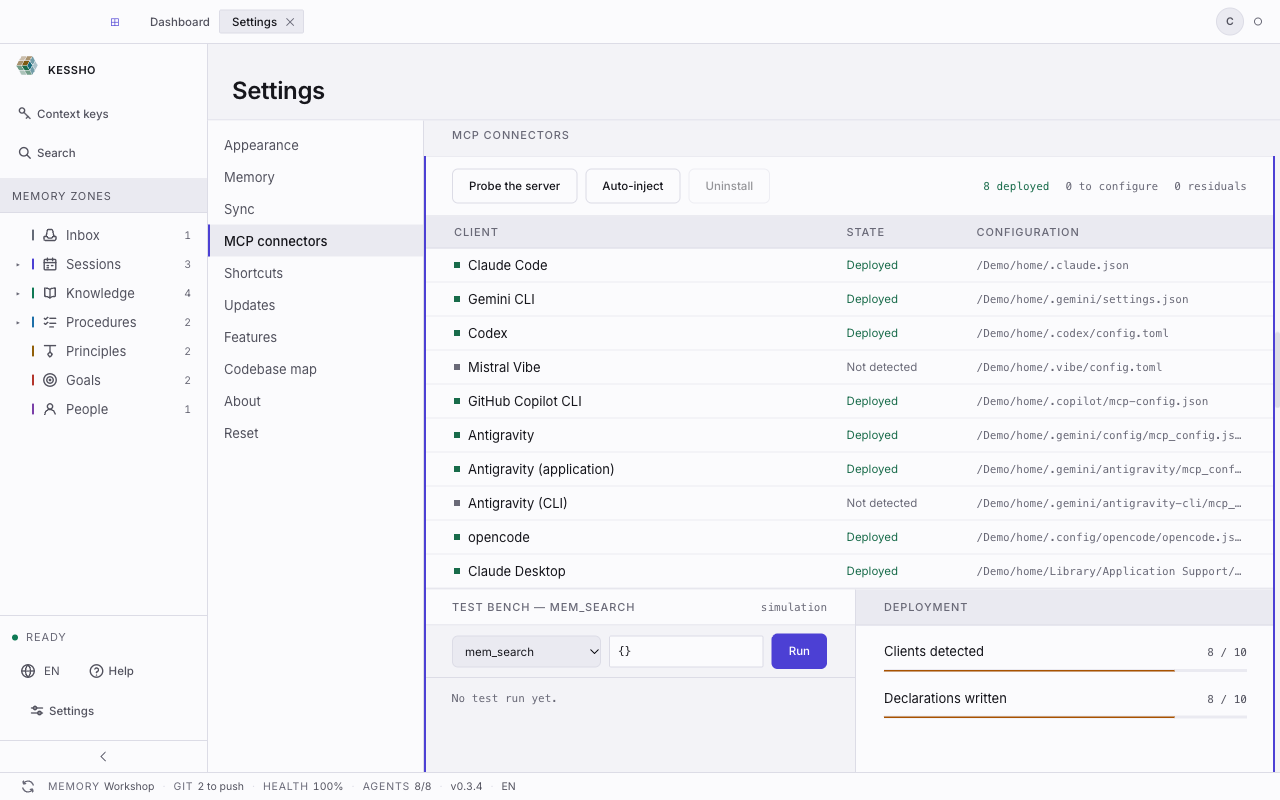
- Settings › MCP connectors: the table of clients with their State (Deployed, To configure, Not detected…), the Probe the server, Auto-inject and Uninstall buttons, and the Deployment panel. The labels are explained in Connect your agents.
- Probe the server measures Kessho's server ("Server reachable · 42 ms"). It does not say that an assistant uses it: for that, ask the agent for a tool (the two requests above) and see whether it answers with your projects.
- The status bar shows AGENTS 8/8 in the capture above (the figure depends on your machine): how many detected clients carry Kessho.
- Under a client, the screen lists the procedures removed or spared, if any.