
Resume a project
This journey picks up where you left off: the agent re-reads what the memory knows about the project, gives you a status, and you propose what comes next. It is the first gesture of a session, see the cycle.
What you ask the agent
« Let's pick up the kessho-docs project again. »
« Show me the current context of kessho-docs, without the briefing. »
« Re-read the session history of kessho-docs. »
« Open the archive 2026-10-19-14h32-kessho-docs-refonte-du-socle of kessho-docs. »
mem_read_archiveslug=kessho-docsfilename=2026-10-19-14h32-kessho-docs-refonte-du-socle
« What do we know about the structure of the kessho-docs repository? »
« That project was finished but I have to reopen it: put it back among the active projects. »
You do not need to type these sentences word for word: with the procedures Kessho delivers (see Connect the agent), a wish to resume ("let's pick up", "where were we?") or a question about the past ("what did we decide?") should be enough to trigger the resume, if the agent follows them. If the target project is unclear, the agent asks you to confirm before loading anything.
What the agent does
The tools on this page read without writing, except two: mem_historize, which moves a project, and mem_git_sync (step 5), which fetches, rebases and pushes if the memory is a git repository.
- Find the project. Most often, it is the slug you give. Without a slug,
mem_recallreturns the vault inventory so the agent can ask you which one.mem_listgives the same inventory in detail: projects, domains, phase, last session, scope, number of archives. Withinclude_archivedit unfolds archived projects; witharchived_onlyit shows only them. According to the procedure, the agent also tries the name of the folder the session is opened in. - Load the context.
mem_recallloads the project's or domain's context. The procedure has the agent turn it into a briefing: last session and phase, state, decisions, active principles, open goals, key people, next steps. It ends by proposing what comes next ("shall we resume at step X?"). - Go finer if needed.
mem_read_contextreads only thecontext.md, the current snapshot, with no briefing: lighter.slugis required.mem_read_historyreads thehistory.md: the chronological thread of sessions, with their count.mem_read_archivereads one given archive (slugandfilename, with or without.md), and only inside the project'sarchives/folder.mem_get_topologyreads the project's topology sheet (its stack, its conventions), possibly that of a branch (branch). A missing sheet is not an error.
- Summarize several sessions at once. That is the job of
mem_digest, see Search the memory. - Catch up. If the memory is a git repository, the procedure has the agent call
mem_git_synconce at the start of the session, to start from what your other machines wrote. Offline or without a remote, it says so in one line and carries on. See Sync the memory.
An archived project
Without an explicit slug, the resume ignores archived projects. With an explicit slug, the agent loads the archived project for reading and tells you so. To write to it again, it must first be brought back among the active ones: mem_historize with revive: true (without revive, it does the opposite and moves a finished project to 10-episodes/archived/). While it is archived, mem_archive refuses to write to it, and mem_digest only summarizes it with from_archived: true.
What you see
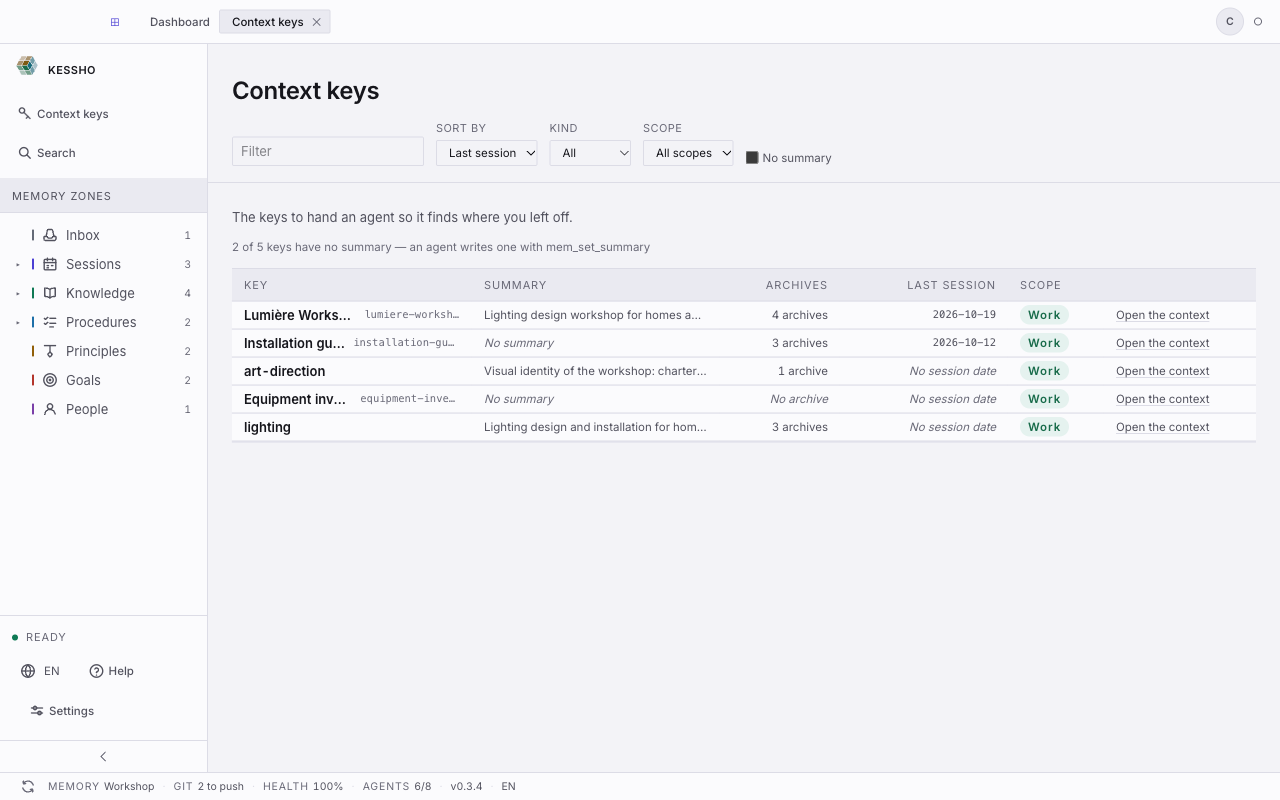
The Context keys screen (sidebar) lists your projects and domains: each row carries its identifier (the slug you give the agent), its summary, its number of archives and the date of its last session. It works as a reminder before you say "let's pick up…". The screen is detailed in Home.
A row showing "No summary" means nobody has set a summary: the screen counts them, and an agent sets one with mem_set_summary (see Archive a session).
The resume itself changes nothing on screen, since it only reads. Only mem_historize (which moves the project) and mem_git_sync (which can bring in notes written on another machine) change the memory; the freshness indicator shows it like any agent write (see Zones).