
Sync the memory
This journey keeps the memory up to date across your machines, with git: see where the repository stands, sync, commit your changes, resolve a conflict. The application does it in one click; the agent does it with four tools, with safeguards.
What you ask the agent
« Where does my memory's Git synchronization stand? Query the remote first. »
« Commit my changes with the message "session notes" and push. »
« There is a conflict with the remote: show me the three versions of each file. »
mem_git_resolveSyncing is not automatic: the agent calls mem_git_sync when you ask ("sync the memory", "where is git at?") or when it judges it useful. The delivered procedures (see Connect the agent) invite it to do so at the start of a session, with the resume, and at the end of a session, with the archive; an agent that does not follow them will not do it on its own.
What the agent does
mem_git_statusreturns the repository state: branch, remote (without credentials), ahead and behind, uncommitted changes, operation in progress, files carrying conflict markers, state of the Obsidian Git plugin. It writes nothing and uses no network by default;fetch: truequeries the remote first. If git is not found, the state says so with the installation command, and the agent relays it to you without running it.mem_git_sync(no parameters) fetches, rebases your local commits if the remote moved, then pushes. Never forced, never an automatic stash. A real conflict aborts the rebase: the repository goes back to its previous state, no marker is left, and the files involved are returned. It is refused if uncommitted changes prevent the rebase.mem_git_commitcommits the uncommitted changes (pathsfor only some, otherwise all) withmessage(non-empty, 1,000 characters at most), then pushes (push: falseto skip). It is to be called only with the user's explicit agreement: those changes are yours. It refuses a file that carries conflict markers, unlessallow_markers: truefor a file that merely quotes them. The AI agent origin's template can only surround the message, which is always kept: see The commit message template.mem_git_resolveresolves a real conflict, in two steps:- without
resolutions, it inspects: for each file in conflict it returns its three versions (base,local,distant) and anempreinte, then aborts: the repository does not change; - with
resolutions(the resolved text of each file, orkeep: "local"or"distant") and theempreintereturned (handed back infingerprint), it redoes the merge, writes the texts, commits and pushes. If the repository or the remote moved in between, nothing is done; no marker is ever accepted or left.
The catalog asks for it to be used only with the user's agreement on the merged text.
- without
What the agent does not do
- Initializing the repository and connecting a remote are gestures of the application (Settings › Sync): no tool does them.
- It never forces a push and never commits your changes on its own initiative.
The automation on every write
When the memory is a git repository and the Automation box ("Agents commit and sync automatically") is ticked, every agent tool that writes is wrapped: before writing it checks the remote, after writing it commits what it touched, and only that, then pushes. Your uncommitted changes do not leave with it, except a file you had already modified and that the tool rewrites: that one leaves with the commit, which names it (a Kessho-Embarque line), and the agent must tell you. Read tools do not run git; mem_git_sync, mem_git_commit and mem_git_resolve sit outside this wrapping because they are the gesture themselves.
The commit's first line is composed by the Automation origin's template (by default kessho({outil}): {objet} {demande}); the body, which lists the files, and the Kessho-Outil, Kessho-Embarque and Kessho-Repris lines always stay, whatever the template.
The result of a writing tool then carries a sync report, which the agent reads every time:
statut | What it means | What the agent does |
|---|---|---|
synchronise | Committed and pushed. | Nothing. |
commite_local | Committed here, not pushed (offline, no remote, authentication refused…). | Tells you in one line, with the reason. |
en_attente | Committed, but your uncommitted changes prevent updating from the remote. | Tells you and proposes mem_git_commit once you have reviewed them. |
ignore | Git did nothing (automation off, no repository, git not found…). | Nothing, except relaying git's installation command. |
conflit | A real conflict: the rebase is aborted and the tool wrote nothing. | Stops and goes through mem_git_resolve, with your agreement. |
erreur | Repository busy, an operation already in progress, or a recovery that could not be completed. | Tells you and retries a moment later; it never deletes index.lock. |
The commit message template
In Settings › Sync, each commit origin has a message template. Two concern the agent:
- AI agent: for
mem_git_commit, the default template is Agent's message,{message}. The agent's message is always kept: it is trimmed, an empty or blank message is refused before any rendering, and the agent's template can only surround it (it must contain{message}, otherwise it is ignored with a warning). An agent's subject is never cut. - Automation: the template only sets the first line of each writing tool's commit.
The message of mem_git_resolve is never affected.
What the agent can observe: when the chosen template could not be used (missing, refused, without {message}, or an unreadable configuration), Kessho commits with the agent's message as is, and the mem_git_commit response carries a signalements list that says why. With no fallback, that field is absent: the response keeps its usual shape. For a writing tool, the same warning appears in the sync report. The agent relays these warnings to you; it never changes the templates, which are set in the application. The content variables ({zones}, {projets}, {fichiers}) and {appareil} write into the git history, pushed to your remote repository: no supplied template contains them.
The agent does not call mem_git_commit on its own: it does so when you ask, or when it judges it useful and with your agreement.
What you see
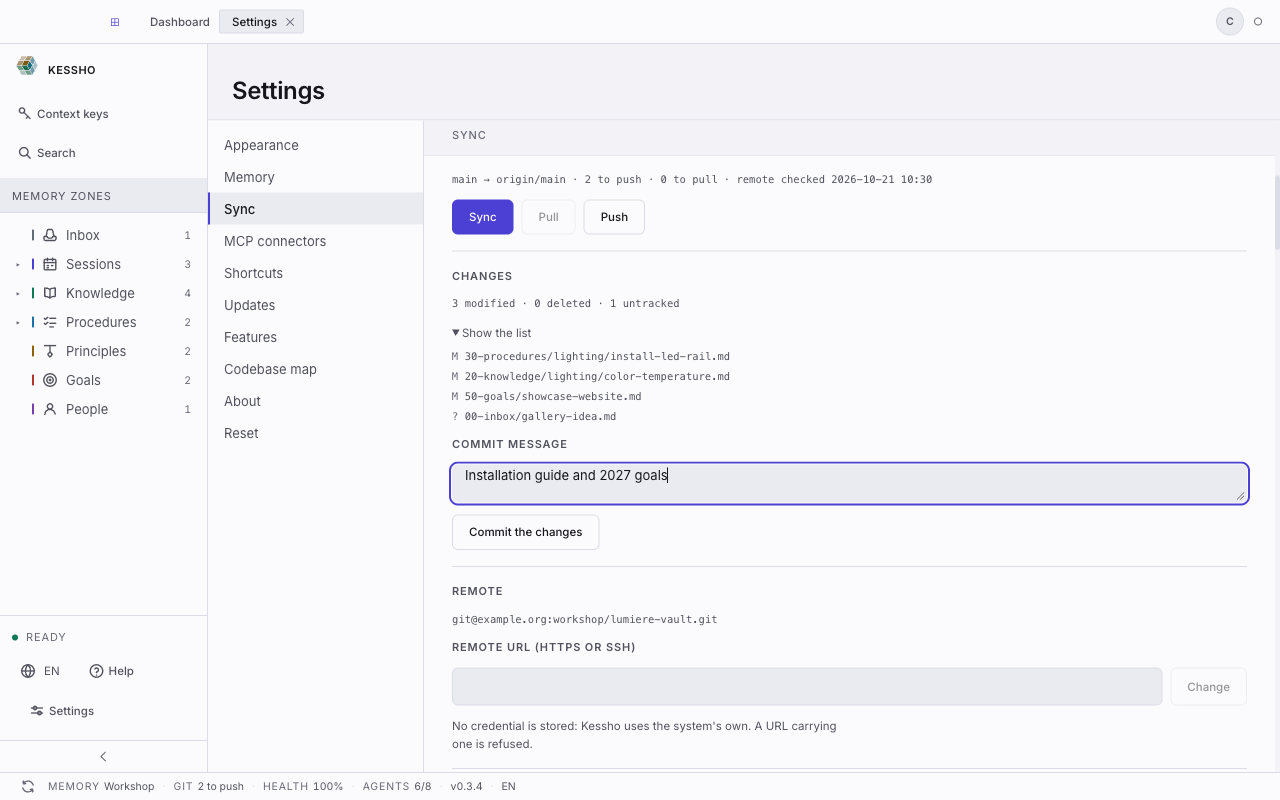
The application shows the same repository, and it is the one that does in one click what mem_git_sync does through the agent: the Sync the memory button in the status bar commits, pulls, then pushes. The GIT field says where the repository stands (up to date, N to push, N to pull, conflict…), and Settings › Sync carries the Sync, Pull and Push actions, the Commit message, the remote, the Automation box and the Commit messages (one template per origin). Everything is described in Sync.
One difference worth knowing: the button commits everything that changed under the message composed by the One click origin's template (by default "vault backup: …"), whereas the agent only commits your changes with your agreement.