
Archive a session
This journey keeps a trace of what the session brought, so the next one starts from there. It has two modes: an update of the context while you work, and a full archive at the end of the session.
Archiving is never automatic. Kessho does not archive anything by itself: an archive happens when the agent calls the tool, because you ask for it or because it judges it useful and necessary. What an agent decides to do on its own depends on its capabilities and on the instructions it follows (the procedure shipped with Kessho, your project's instructions): some archive on their own initiative, others wait for you to ask.
What you ask the agent
You can ask for the context to be updated at any time. Depending on its capabilities and instructions, the agent may also do it on its own when it judges that a fact, a decision or a next step is worth keeping; no Kessho rule obliges it to. To trigger it yourself:
« Set the kessho-docs project phase to "writing", without touching the rest of the context. »
« Set this summary on kessho-docs: “Bilingual Kessho documentation, MCP reference derived from the catalog.” »
mem_set_summaryslug=kessho-docssummary=Bilingual Kessho documentation, MCP reference derived from the catalog.
At the end of the session, it is up to you to ask for the full archive ("we're stopping", "I'm done", or /mem-archive in Claude Code); an agent may also suggest it or run it on its own if it judges the session rich enough:
« We're stopping here: archive the kessho-docs session. It settled the outline of the “With an agent” section; also keep the principle “only document what the code supports”. »
mem_archiveslug=kessho-docsmode=fullarchive_subject=Outline of the With an agent sectionarchive_body_md=Outline settled: seven journeys, one check on the tools cited.context_md=## Where the project stands The “With an agent” section is being written. ## Next steps 1. Proofread the seven journeys.derive=[{"fact":"Only document what the code supports","body":"A claim the catalog does not support has no place in the section.","kind":"principle"}]
« Cancel the last archive of kessho-docs, I picked the wrong project. »
What the agent does
During the session: incremental mode
mem_archive without mode (or with mode: "incremental") rewrites only the project's context.md. No archive is created, no line is added to the history.
slugis the only required parameter.context_mdis the whole new body: it replaces the current one. To keep it as is (for instance to set only a phase), the agent omits the field. An empty string is refused, nothing is written.phasesets the phase, only if provided.mem_update_phasedoes the same alone, preserving the body word for word; an empty string clears the phase.expect_decisionslists decisions that must survive in the new body: if they are gone, the call is refused.- A
[[…]]link in the body that leads to no note is refused: the agent fixes or removes the link.
Refusals come before the first write: a refusal never leaves anything half done.
At the end of the session: full mode
mode: "full" does three things: it creates a timestamped archive in the project's archives/, it adds its line at the top of history.md, and it rewrites context.md. It requires:
archive_subject(the short subject) andarchive_body_md(the archive body);- what the session leaves that lasts, or why it leaves nothing. Either
derived_atoms(links to notes that already exist), orderive, orno_derived_because(the reason). The server refuses silence: an archive that says neither is not written. A plain "nothing lasting tonight" is enough forno_derived_because, but an empty string is not. The idea is that a fact left inside an archive is harder to find again than a note of its own.
derive is the shortcut: a list of facts (fact, body, kind among principle, goal, knowledge) that the tool itself writes as notes in their zone, with a link back to the session. If one of the names is already taken, the whole archive is refused: no note is overwritten, no suffix is added.
Options: archive_aliases (the everyday words by which this archive will be searched later, which helps it surface in mem_search) and archive_extra_fm (extra frontmatter: tags lists are merged, other keys are replaced).
[[…]] links are checked as in incremental mode, in both bodies (those of the notes derive is about to create count as existing). The project must be active: an archived project is refused (see Resume a project).
After the archive
mem_set_summarysets the project's short summary, 300 characters at most, in the frontmatter ofcontext.md. The catalog asks for it to be called after every archive: the summary is written by the agent, the vault cannot guess it.- If the memory is a git repository and the Automation box ("Agents commit and sync automatically", in Settings › Sync) is ticked, Kessho's automation commits and pushes what the tool has just written, and the procedure has the agent call
mem_git_syncat the end of the session. See Sync the memory.
Cancel the last archive
mem_rollback_archive (slug) deletes the project's last archive and removes its line from history.md. Two limits, stated by the catalog and by the code:
context.mdis not restored: it keeps the body the archive had written.- the notes written by
deriveare not removed: the tool only touches the archive and the history.
The tool has no guard: no confirm, it deletes as soon as it is called. The agent should ask you to confirm before calling it.
The deleted archive does not go to a trash: only git history, if it had been committed, keeps it.
What you see
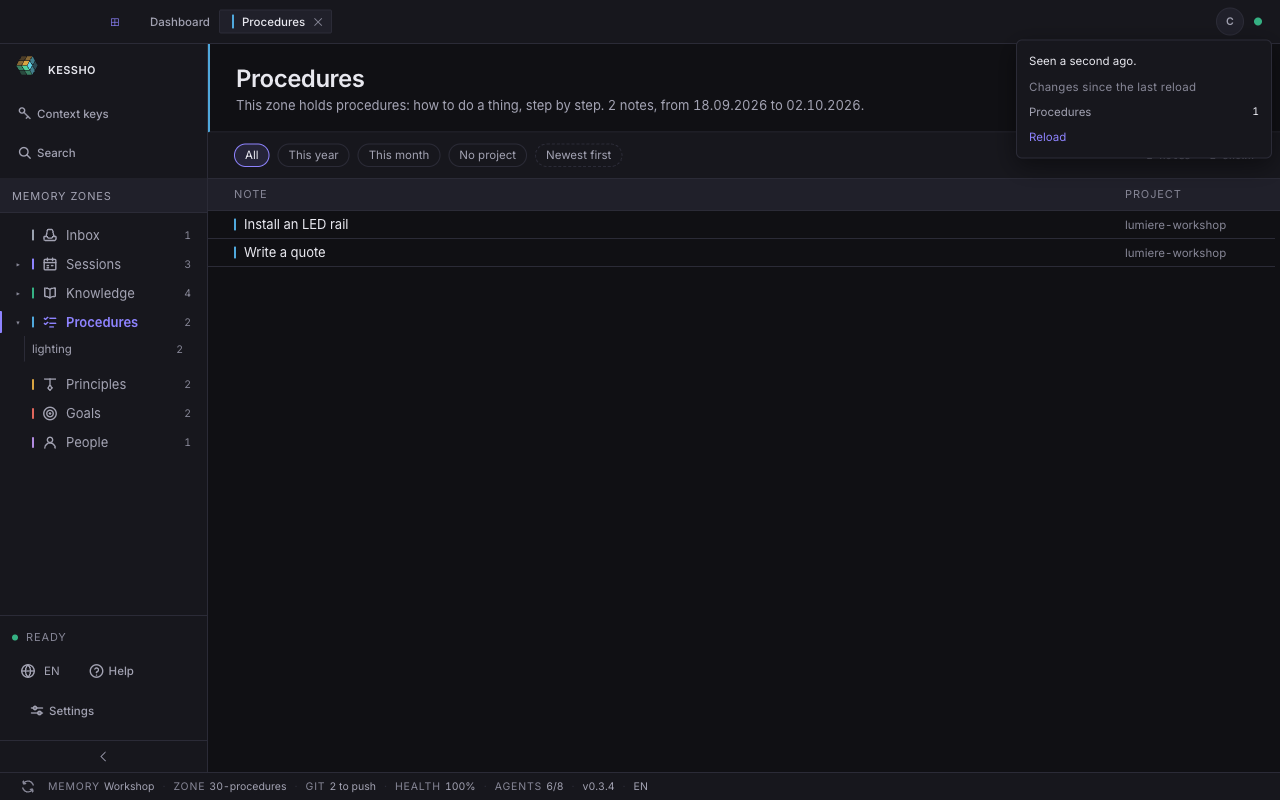
When the agent writes, the freshness indicator (the dot at the top right) lights up. Its panel says how long ago and which zone moved; Reload refreshes the screen (see Zones).
An archive appears in the Sessions zone, under its project; the context is the one the Context keys screen reads, with the number of archives and the date of the last session (see Home). The GIT field of the status bar says where the commits stand (see Sync).