
Help
Kessho's help is a window that presents some of the tools your AI agents can call in the memory. It opens from the sidebar, over the current screen, and changes nothing in your memory.
What you see
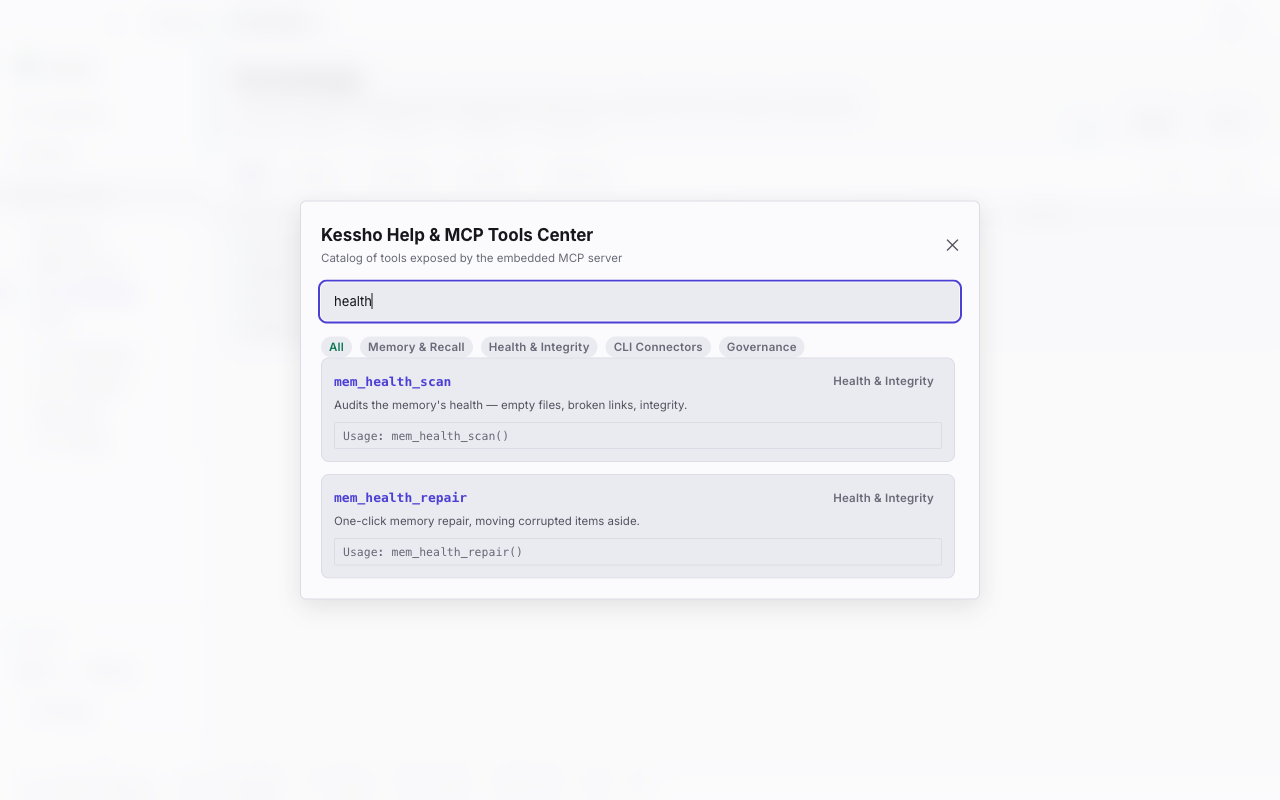
Click Help at the bottom of the sidebar, next to Settings. The Kessho Help & MCP Tools Center window opens.
- The title and its subtitle: "Catalog of tools exposed by the embedded MCP server".
- The search field: "Search MCP tool (e.g. mem_recall, health)...".
- The families, as pills: All, Memory & Recall, Health & Integrity, CLI Connectors and Governance.
- The tool list: for each one, its name, its family, a sentence saying what it is for and an example call ("Usage: …", shown as is).
- A ✕ button, top right, to close.
This list is a preview: about ten tools, not all of them. The complete, up-to-date list is in the MCP reference.
What you can do
Open the help
Click Help in the sidebar. When the sidebar is collapsed, the button keeps its icon (a question mark) and its Help tooltip.
Search for a tool
Type in the search field. The list narrows to the tools whose name or description contains your text, ignoring case. If nothing matches, the window says "No MCP tool matches your search."
Filter by family
Click a family to keep only its tools; All shows them again. The search and the family combine.
Close the window
Click the ✕, or click outside the window, on the backdrop.
Go further
- To learn how to ask an agent for these tools, see Connect your agents.
- For the detail of each tool, its parameters and examples, see the MCP reference.